About Projects
You can use HYPE Projects to further develop the submitted ideas. HYPE Projects allows you to create your own custom processes.
A process runs through one or more phases where each phase consists of multiple activities with tasks to be completed. For each activity, you can define tasks that have to be completed by the project team. A process consists of phases, which are implicitly followed by gates. Thus, a process is an alternation of phases and gates.
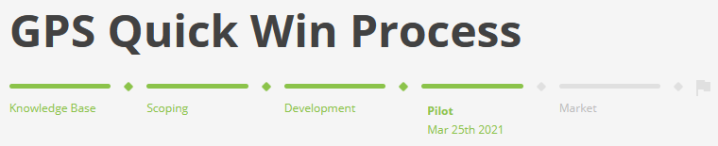
Sample: Custom Process with 5 Phases
Projects
Portfolio managers create the projects, assign the project leaders, the project team, and start the project (first phase).
Project Phases - Elaboration and Gate
Project phases are either in Elaboration or in Gate (decision).
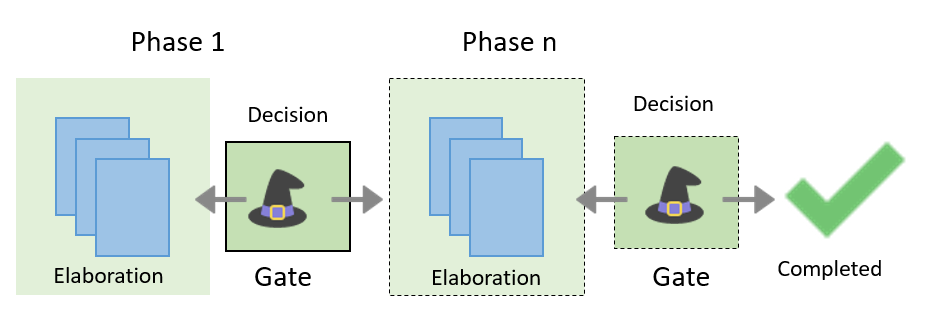
At the end of the elaboration, when a decision is needed, the project phase reaches the decision gate where the gatekeeper is in charge. While the phase is in the gate, the project team can no longer edit the project. After the last gate has been passed, the project can be set to completed.
For each phase the project leader assigns the gatekeeper, who decides about moving the project to the next phase.
Roles and Rights
See Roles and rights.
Reporting
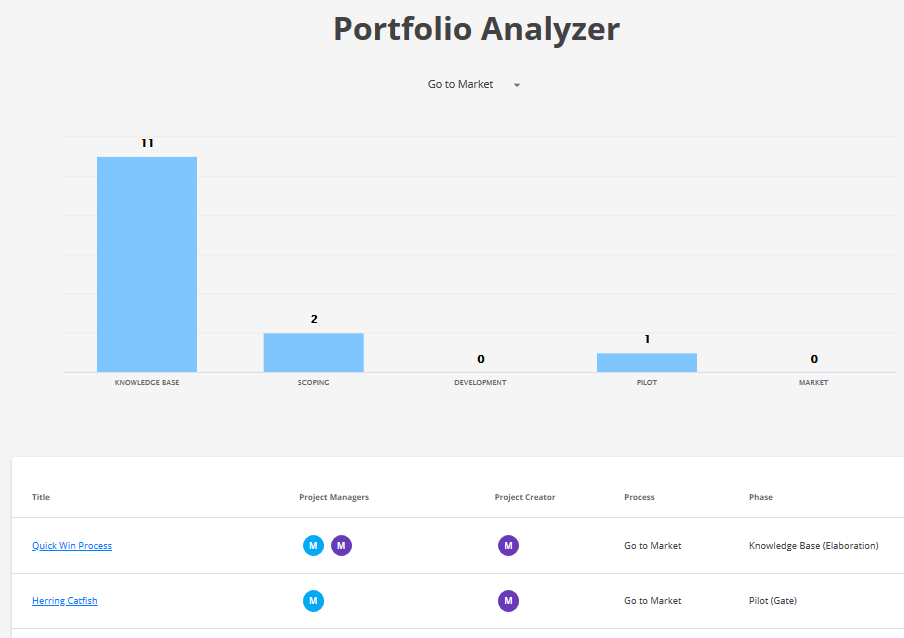
The portfolio analyzer displays the progress on projects. A bar chart represents the number of projects per phase. A click on the bar displays a list of the corresponding projects. The chart displays running projects (draft, completed and canceled projects are not considered).